Find your symptom, read the cause, apply the fix. The 15 entries below come from the NX2Apple README, ENTITLEMENTS.md, BUILDING.md, release notes and open GitHub issues, and cover the launcher on Mac and Windows, builds, and the iPhone and iPad app.
Filter by the device the problem appears on. "All" entries apply to every platform.
15 fixes shown
Mac
macOS will not open the launcher the first time
CauseThe app is not signed with a paid Apple developer certificate
FixRight-click the app, choose Open once; later starts open normally
Mac
NVN game build fails with the App Store Xcode
CauseNVN games need Xcode 27.2 (macOS 26.6 or later) unless built with --allow-other-metal
FixInstall Xcode 27.2 from Apple's download page, name it Xcode-27.2.app, pick it in Settings > Build tools > Choose Xcode
iPhone / iPad
Big game is killed on iPhone (Tears of the Kingdom at the world map)
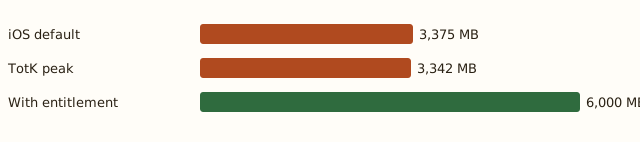
CauseWithout the Increased Memory Limit entitlement iOS allows about 3,375 MB; the game was killed at 3,342 MB resident
FixInstall with AltStore Classic 2.2+, Impactor or Xcode with a Personal Team so the entitlement is kept
iPhone / iPad
SideStore install still runs out of memory
CauseA free Apple ID App ID lacks Increased Memory Limit
FixSideload GetMoreRam, open App IDs, Refresh, select the app, Add Increased Memory Limit, then reinstall from SideStore
iPhone / iPad
How to tell whether the memory entitlement took effect
CauseDocuments/log.txt reports resident memory plus headroom
FixAbout 3,375 MB means it is not in effect; 6 to 8 GB means it is
Mac / Windows
Extractor refuses the whole prod.keys file
CauseSome dumpers write lines whose hex value has the wrong length
FixDelete the malformed lines and keep a backup of the original file
Mac / Windows
Build stops because the update version does not match
CauseThe update NSP display version must match the version the game profile registers
FixUse the update listed for the game on the compatibility table, or the base game alone where it says None (v0)
All
A game outside the list will not build
CauseOnly games with a profile can be built
FixCheck the compatibility table first; new titles need bring-up work upstream
iPhone / iPad
Short stutters the first time a scene appears
CauseThe app compiles graphics for a new scene once and remembers them
FixNormal behaviour; the stutter goes away after the first visit
iPhone / iPad
iPhone no longer reads an old romfs.idx archive
CauseBuilds now write a single romfs.img; the old shard archive is not read
FixSend the game data again once, as a romfs.img through the launcher
Mac
Space check says Zero KB is free on an external drive
CauseReported on 1.4.0-rc2: macOS answers 0 for the capacity key on an ExFAT drive, so every build stops
FixOpen issue #1155; the same drive built with 1.3.0, which had no space check
Mac
Fullscreen with several monitors blanks the other screens
CauseReported on 1.3.0 and 1.2.3 with three displays
FixOpen issue #1085; the reporter recovered only by unplugging the extra displays
iPhone / iPad
Signing fails with Apple error 9120
CauseA free Apple ID can register at most 10 App IDs in 7 days
FixWait a few days or use a paid team; rebuilding with a new bundle ID does not help
Mac
Game opens to a black screen on the Mac
CauseOlder builds recompiled every pipeline at first start
FixFixed in v0.7.2 (e.g. Super Mario Bros. Wonder); update the launcher and rebuild
All
Reporting a crash or build failure
CauseReports need the game, title ID, versions, device and log
FixUse the issue forms, attach Settings > Copy diagnostics and the full log; never attach keys or game files
Memory budget
Why big games get killed on iPhone
iOS caps how much memory one app may use. Without the Increased Memory Limit entitlement the cap is about 3,375 MB, and Tears of the Kingdom was killed at 3,342 MB resident when it reached the world map. With the entitlement the app gets 6 to 8 GB.
The entitlement survives installation with AltStore Classic 2.2 or later, Impactor, or Xcode with a Personal Team. SideStore needs a one-time GetMoreRam App ID fix, and Sideloadly does not keep it at all.
Open an issue with the GitHub issue form, paste the output of Settings › Copy diagnostics, and attach the game's log from the table above. Never attach keys or game files — maintainers cannot accept them.