
NX2Apple Setup Guide
This guide takes the NX2Apple launcher from a fresh download to a first playable game: what you need on your desk, the four install steps on an Apple silicon Mac, the Xcode version NVN games demand, how a game reaches an iPhone or iPad, and where saves, logs and env.txt settings end up afterwards.
13Lowest macOS for the launcher
27.2Xcode for NVN games
26Lowest iOS / iPadOS
.NET 10Only tool setup installs
Pre-launch checklist
Tick each line as you confirm it. Your ticks stay in this browser only, so you can come back after installing Xcode.
Everything is in place. Start the install steps below.
Check your game's required update → Install the launcher on a Mac
The README lists four steps. The launcher handles the build project and its tools itself, so git, Homebrew and a separate Python install are never needed.
Updating a game you already built
Select it in the library and choose Rebuild. For a newer update NSP, leave the base game selected, add the update under Updates & add-on content and build for This Mac into the same output folder. Cached work is reused and the saves, stored outside the .app by title ID, carry over.
On a Windows PC instead
NX2Apple-windows-x64.zip contains NX2Apple.exe with the engine tree and extractor bundled, a guided first run and its own updater. It does not make Mac apps; its shared mode exports NX2Apple.ipa for a sideloader.
Choosing Xcode 27.2
Games that render through NVN need the Metal compiler from Xcode 27.2, which itself runs only on macOS 26.6 or later. A newer Xcode from the App Store will not do; the only exception is a manual build with the --allow-other-metal flag.
If you keep both copies, rename the older one to Xcode-27.2.app. Then open Settings › Build tools › Choose Xcode… and select it, even when it sits on an external drive. During the first-run wizard, press Set up later to reach Settings first, and Run setup again after the choice. Use system Xcode follows whatever xcode-select points to.
sudo xcode-select -s /Applications/Xcode-27.2.app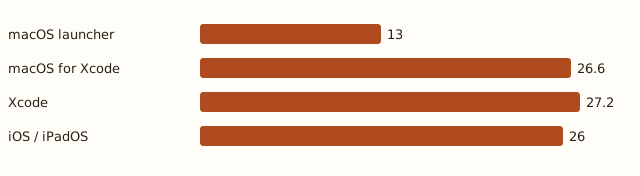
Getting games onto an iPhone or iPad
Every game you build for iPhone / iPad lands in one shared shell app. There are two ways to get that app onto the device.
Install on device
Paired device- The launcher signs the shell app with Xcode using your own team, installs it over the pairing and copies the game in.
- Re-signing or reinstalling keeps game data and saves.
- Signing with Xcode and a Personal Team keeps the Increased Memory Limit entitlement.
Export as IPA
No device needed- The Install card switch writes an unsigned NX2Apple.ipa into the shell folder, with no device or signing team.
- Sign it with AltStore Classic 2.2+, Impactor or SideStore; game data is sent separately in step 3.
- The project notes that export has not been tested end to end on a real device.
Inside the shell app
LibraryOne column in portrait, Cover Flow on its side, a grid on iPad
Touch2D and 3D layouts, switched with the button at the top centre
ControllersXbox, PlayStation, Switch Pro and MFi replace touch controls
ButtonsA picks, B goes back, X opens game settings, Y lists controllers
Game dataromfs.img can sit on an external drive picked in Files
Cloud savesChoose an iCloud Drive folder to stay in step with the Mac
Save, log, settings and mod paths
Grouped by what you are looking for. On the Mac, a game built into a library folder keeps its saves and log next to the app; otherwise the defaults under ~/Library apply.
Saves
3 paths Mac, library folder
Beside the game app in the library folder Mac, default location
~/Library/Application Support/nxnative/<title ID>/ iPhone / iPad
Files app > app folder > save/ Logs
3 paths Mac, library folder
log/<title ID>.log beside the app Mac, default location
~/Library/Logs/nxnative/<title ID>.log iPhone / iPad
Files app > app folder > log.txt (previous run: log.prev.txt) Launch settings (env.txt)
3 paths Mac, per game
~/Library/Application Support/nxnative/<title ID>/env.txt iPhone / iPad, every game
Documents/env.txt (applies to every game) iPhone / iPad, one game
Documents/games/<title ID>/env.txt Mods
1 paths iPhone / iPad, one game
Documents/games/<title ID>/mods/<mod name>/ Launch settings beyond the menu
An env.txt file holds KEY=VALUE lines for options the Launch options sheet does not show. On the iPhone, the file in Documents/ applies to every game in the shared app, and a game's own file wins wherever both set the same key. A mod needs no env line at all: drop its folder into the game's mods/ directory and the shell sets the overlay for that game only.
Read a log line or fix a failed build →Example lines from the README
DM_FPS_TARGET=30Caps the frame rate to save batteryDM_OPMODE=0Starts the game in handheld modeDM_LANG=zh-HansForces the game languageFrequently asked questions
Do I need git or Homebrew to install NX2Apple?
No. The Mac launcher carries its own build tools and Python, downloads the build project itself with the Download repository button, and installs the .NET SDK 10 from its dependency page. The Windows package goes further and bundles the whole engine tree.
Why does macOS refuse to open the launcher?
The launcher is not signed with a paid Apple developer certificate, so Gatekeeper stops a plain double-click on the first start. Right-click the app, choose Open and confirm once; from then on it opens normally. The iPhone app is signed separately with your own team by Xcode.
Can I build iPhone games without a Mac?
Yes, with NX2Apple-windows-x64.zip on a Windows x64 PC. Its shared mode exports NX2Apple.ipa, which you then sign and install with a sideloader such as AltStore Classic 2.2 or later. Building a playable Mac app still requires an Apple silicon Mac.
Will rebuilding a game delete my saves?
No. Mac saves are stored outside the .app, keyed by the game's title ID, so a rebuild into the same library keeps progress. On iPhone and iPad, re-signing and reinstalling the shell app keeps game data and saves, and deleting a game from the library keeps its saves too.